Showing posts with label ubuntu. Show all posts

Saturday, November 5, 2016

#vDM30in30 11-04-2016 @arielsanchezmor Ubuntu on my laptop

As with all #vDM30in30 posts, it's a good idea to read what it's all about first here.

I spent quite a few hours doing the things I detail below, so this post went out 11/05. Sue me :)

Linux (desktop), Linux (server), BSD

Every day that passes I realize how much more I need to be learning Linux and BSD. I am taking the LFCS exam by end of month, and I've already decided I will take it on the CentOS 7 flavor. But, since I don't work with Linux day to day, it's tough to really use it every day if all my machines are Windows.

Well, nothing beats hands-on learning - so today I decided to move at least one of my laptops permanently to Ubuntu 16.04 LTS. Before you tell me to switch to mac, please know that I'm not a fan of Apple and their overpriced, locked-in model, so it's either Linux or BSD for me. For my parents though, Apple it is, and they are happy with it so I'm happy with that too.

There's lots, lots more info on Google for Ubuntu than there is for OpenBSD, so if I'm going to be productive on my laptop, I'll start with Ubuntu, and when I actually have a better idea of what I'm doing, I'll move to a BSD. Truth is, lots of concepts about unix are the same on both platforms, so I'm taking "the easy road" for now until I get better at all this.

So hopefully this is the beginning of my Ubuntu->CentOS->OpenBSD journey. I also have a Raspberry Pi3 that is running Raspbian on ARM, so hopefully when I get to programming I can see some differences too! Hopefully all of this gives me enough exposure to both Debian and RedHat based systems.

Moving one of my laptops to Linux

I am writing this from inside the fruits of my labor - spent Friday night installing Ubuntu 16.04.1 LTS on my Acer ES1-111M. This time I stopped the dual boot non-sense - the recommendations I made in that post only lasted until the next upgrade. I don't have time for all that, so I grabbed a spare SSD I had around and decided I am committing to Ubuntu on this laptop for the long term.

Now, you know I like this laptop from my previous post, but the problem is you can't get it anymore. My wife liked it a lot too - it's small and convenient and with max ram and SSD it works perfectly fine. She wanted a similar one, and on Amazon Prime day I ended up getting her the Lenovo 11e 3rd gen, which already came with the 8GB of ram and a 128GB SSD (m2 sata btw), for $250. She has liked it so far - most of her gripes are from Windows 10, and not the hardware. The keyboard on that is much better than on the Acer, and the screen is a bit better, but it does bring in a fan :( I see you can get it for $300 now - I left my affiliate link to it below and in the hyperlink above. 


My point is - you can always find a really cheap, small laptop, especially when sale season time comes around (black friday, wink wink). It's amazing the value you can get for 15 inch laptops, but 12" is just such a convenient size - what's better than a laptop you can tuck anywhere and even if you lose/break it, it doesn't hurt since it was so cheap?

Anyways, back to this laptop on Ubuntu. I made a quick post with the installation details in my IT Learning blog - let me know if you make the switch and I can help in any way, but my first recommendation is to try installing it with a few different distros and options and see what works out of the box and what doesn't.

https://learning-in-it.blogspot.com/2016/11/running-ubuntu-1604-lts-on-acer-aspire.html

Everything else

Is on standby for now :)

Tuesday, April 26, 2016

Windows 8.1 / 10 and Ubuntu 16.04 LTS on the same laptop (good old dual boot)

There was a time when you could install Linux on your windows machine and it would make itself some space and you would reboot and get a Grub selection screen and the world was good.

Well, UEFI / secure boot and all these new "features" said no to that. Thanks Microsoft (and whoever argues it wasn't Microsoft that put in all these complications can read this)

The dual boot process today can be basically described as a root canal:


Like the meme goes, ain't nobody got time for ALL that.

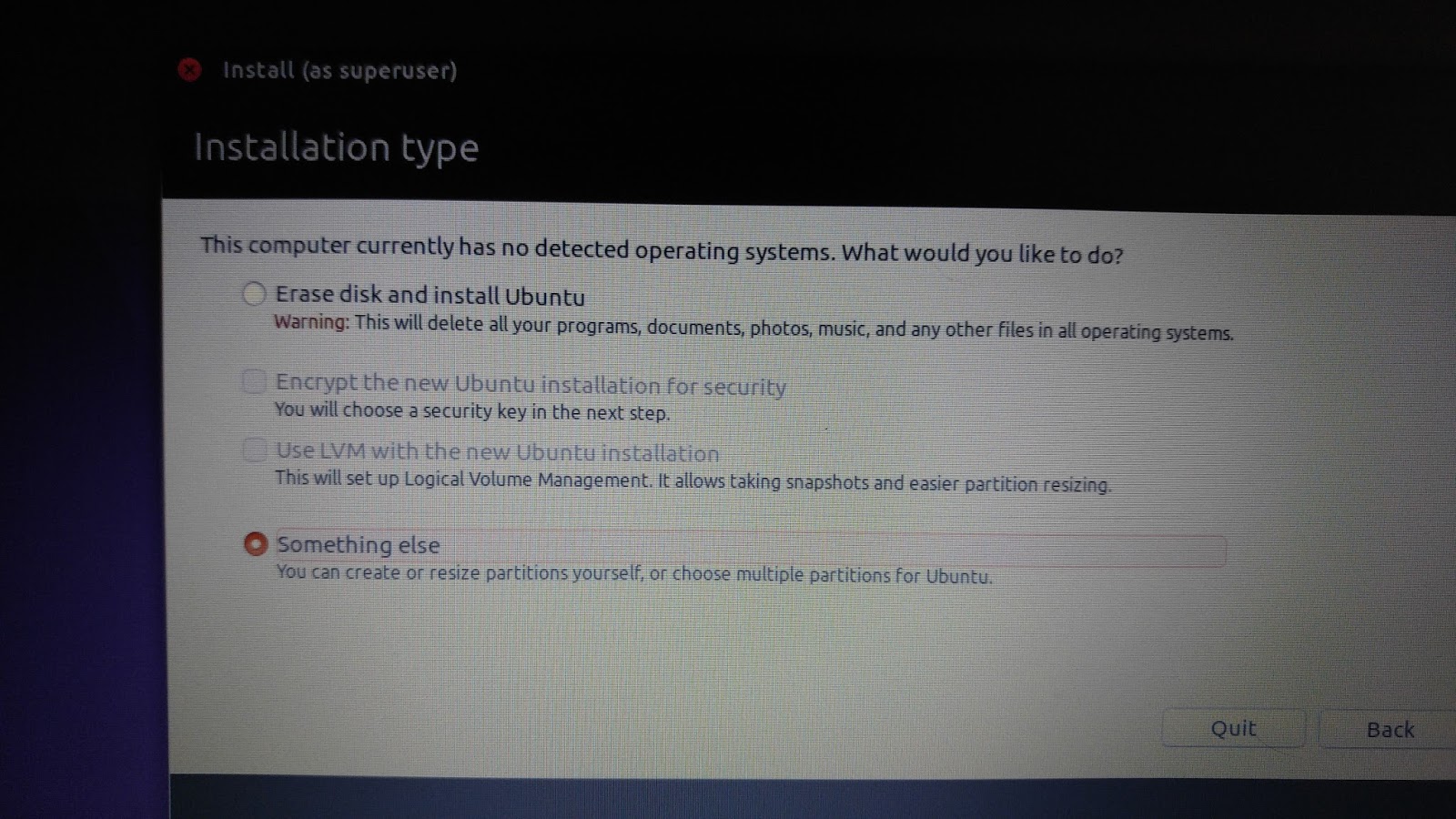
Here's what I did. And pardon the quality of the pics, I used my phone to grab the installer and disk screens.

First, I installed Windows 8.1 in UEFI mode with secure boot, yadda yadda. This is the only way I will get a properly activated installation and be able to upgrade to Windows 10, since that is the version that my BIOS Windows OS activation key is for - another genius "feature". On this installation I didn't give it the whole hard drive - only a section of it. I used 100GB + 500MB it takes for it's stupid partitions, then multiplied by 1024. After the warning that it will create some partitions for itself, you can see the final partitions it created, both on the installer and in Disk Manager once the Windows OS is running.


Second, I changed the BIOS mode to Legacy. Ah, BIOS like BIOS should be. This effectively makes Windows stop booting, since Windows relies on all the new features we just disabled. Your BIOS options will vary but there will be a way to do this (and hopefully, this option never goes away!)


Third, I booted the Ubuntu installer to install on the free space. In legacy Boot mode, Ubuntu sees others partitions but doesn't recognize it's Windows, hence you had to leave the free space from the Windows installation (or shrink it if you already are running Windows) and do the installation manually by selecting "Something Else".


I had to create a swap, /boot, / and something new to me, a Microcode reserved Boot partition. It said it only needed 1MB, but when I gave it 1MB, it balked, so I gave it 10 and it continued. I also left myself some free space in case I ever want to move things out of /. This is a personal choice and you can do whatever you want to maintain later. Here is my order:


I left the MBR boot info in the lone disk in this laptop and proceeded to finish the installation.


Voila - Ubuntu boots perfectly fine, thinking it's the only OS. No messing around with ANYTHING. You can see the output of disks from the Ubuntu OS:


I still wonder what will happen when I upgrade Ubuntu, as I should be at least getting a GRUB screen on boot and I currently don't see it. This screen is what would be showing the old and new version of the Kernel and the recover options, but I guess I will find out soon enough and will update this post when I figure it out. My intuition tells me that maybe I should asked the MBR to boot on that 10MB partition, so I will dig further if I ever care enough.

Fourth, and finally, If I want Windows, I go back into my BIOS settings and select the UEFI bios mode. Windows boots up perfectly. You can see what disk manager sees in this photo:


So if you are tired of playing with all the Windows settings and trying to fix the Ubuntu boot process inside UEFI, why don't you give this method a try? I had enough myself.

Saturday, October 15, 2011

checking out ubuntu 11

I'm selling my PC, and boy has it been fun. Between selecting a pricing strategy (I went with aggressive), coordinating delivery of parts and working around what's left, I've had fun.

When I sold my windows OS HD, I immediately felt a test drive of good old ubuntu was in order, as the install should be much quicker than windows 7 (not just the install but being able to work "out of the box"). I downloaded 11.04 and was up in about an hour (that damn installer still downloads a lot of stuff even if you tell it not to).

Pretty solid. I was able to RDP to my laptop, run fansub videos, browse. Getting skype to work was a bit fun - I'll put that and fail safe decoding Hi10P in another post.

I don't particularly like the new interface - it hides the applications behind at least 3 clicks - but it's not untolerable either. It feels like a tablet lol.


About 3 days into playing, 11.10 came out. I like it a bit better, except that it messed up my codecs a bit. Still, that I have only had to use the terminal for 3 things, is really an accomplishment and a long way traveled for usability.

Saturday, April 10, 2010

Bleach (anime and manga), my pulsar-x, hell I might as well ask what a corolla, elantra and mazda3 are worth, and get married!

So, if you aren´t stuck in anime oblivion, this week we had 2 great bits of news on bleach: first, in the anime, the zanpakatous have finally said "this is as far as we go" and next week we have the fight between ulqiorra and Ichigo! This should be monumental and I´m impatient to see it :D

aaand in bleach manga 411, we finally see aizen battle it out with Isshin (if ever for a brief second, but Aizen did use kido) and we see Gin´s bankai! Apparently Ichigo is not impressed and we should see this fight escalate. The truth is Gin seems to be testing waters only, he´s mighty deceptive...

My pulsar-x should be ready today, after a full clutch change. I´m actually awaiting this with high expectations, since I feel the car will be more responsive now to the power produced by the motor :D they had quoted $300 but final bill is for $220, so that´s good news!

You did see the toyota Yaris prices right? Damn, too expensive for an entry level car. I`m going to quote a mazda 3, a corolla, a nissan tiida and a hyundai elantra just to see where car prices are.

Oh, and battlefield bc2... wow its completely different in multiplayer than the single player game. Helmut (holy.cow, who got me (? am I there yet?) into serious gaming) had told me the single player was crap but I actually had fun with it, but playing online is so much more serious... I´ve only managed to play one night and only got like 1,200 points! But oh well, I´m the new guy and have to learn and adapt.

Aaand... new tag for today. I`m writing this in a separate partition I made for ubuntu 9.1. I can honestly say this is a very easy to use distro - it automatically told me I needed propietary drivers for my video card and the wireless (mine is a dektop, and + wireless it has 2 NICs) and went, found them and installed them. Also, when playing my anime videos, it told me I was missing codecs, found them and installed them. Not even windows is this easy. It did fail to tell me I had to close the video player and re-launch for them to be loaded, but that is the only nitpick in what could be a big time waster. Imagine, so far, I have not typed one single command in the shell and I`m enjoying my ubuntu! Also, nice touch, after asking for my password, I was able to see my big ntfs partition where I keep my stuff.

Today´s saturday after payday, so that means go pay your stuff. I just wish there were smaller waiting lines at the banks... and also, we are looking for a church to take the catholic curse to get married. We are thinking san antonio in guadalupe, or fatima in san pedro. We let Amy´s dad know last Sunday, Amy was real nervous lol but I think he received the news well. He was worried Amy wouldn´t continue her studies, but I guess he doesn´t know us that much... I´m already planning another masters after this one (business administration focusing on finance :D).